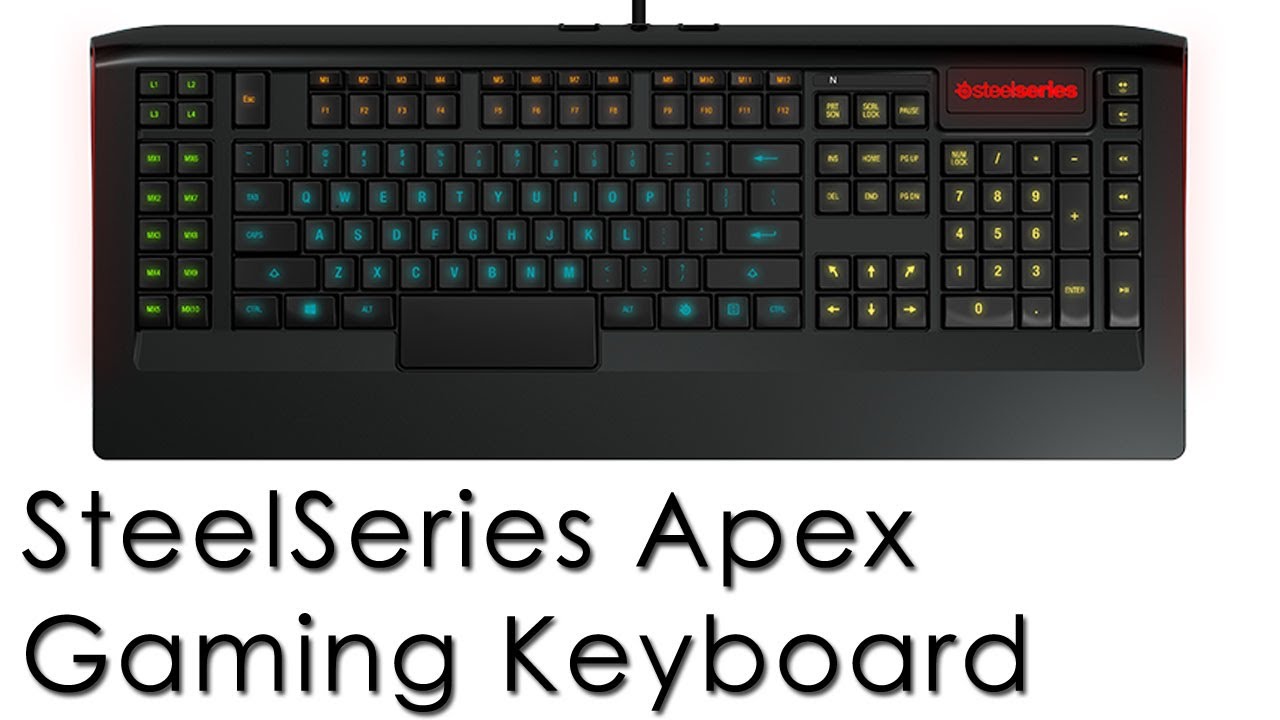
So, my birthday is in a couple of days and I have decided to take this time to upgrade some of my computer's counterparts. The first upgrade, an early birthday gift, was a new keyboard. I got the Steelseries Apex Gaming Keyboard.

So this is my keyboard, you can see some of it's features right of the bat. For example, the keyboard has custom-color back lighting, which is a mostly cosmetic feature but can be helpful if you prefer certain colors. Each region of the keyboard can be lighted to different colors, you can see the regions in the top image. They include the letter area of the keyboard (the main area of sorts), the keys on the right side of the keyboard such as the home, page up and down keys, the number pad and the arrow keys, the third region is the F-keys and M-keys, the fourth region is the MX-keys and the L-keys, and lastly you can change the color of the Steelseries logo simultaneously with the lights on the sides of the keyboards. Some people might find this helpful, I mostly like it so I can have pink back lighting, to be honest. But if you are a visual aesthetics person like me, you'll love this feature as well as it's sleek design. It's much prettier than my last keyboard, which was the Logitech G15.
It also features a large space-bar, which you can see in the above picture. It's not very attractive, but it is comfortable for gaming. You thumb lays across it and it's very responsive and click-able. I thought it was a little weird at first, but it's definitely an improvement on classic space-bars.
The keyboard has macro keys above the F-keys, called M-Keys. These are raised so you can reach them easily and if needing a quick key combo, you could slide you finger down from the M key to the number key. I didn't think I'd use the M-keys because I thought they were going to be out of reach for my fingers, but they are very reachable and I started using them immediately after getting my keyboard.
Along the left side of the keyboard is more macro keys called MX-keys. There are ten total. These were a requirement for me when looking at keyboards. I love macro keys on the right hand side for gaming but also for extra keys to open documents or the internet or Teamspeak. Above them are the L-Keys. These are your different profiles for your keyboard, there are four. I don't really use multiple profiles, but I did change L2 to a lights-off mode so I could easily turn the back lighting on and off.
It should also be noted that all the other keys on the keyboard can be key bound and is fully customizable so you really have a complete keyboard of macro keys. If you need that many.
The arrow keys have two additional diagonal keys. I didn't really care about them when purchasing the keyboard because I don't really use the arrow keys, but they might come in handy if you do. The only time I use arrow keys is to move the bar when I'm typing and the diagonal keys don't seem to work with that.
I know this is a bad picture, but on the right hand side beside the number pad is volume and cinematic keys. I really like the volume keys this keyboard has and use them all the time. I think it works a lot better than the volume wheel on the G15.
The keyboard features two USB plug-ins on it, which was a must to me because I keep my headphones plugged into them for easy connect-disconnectivity. It's good that there are two because it takes up two USB ports on the back of your computer. (One if you don't want the USB plugs on the keyboard to work). The USB ports have an odd angle to them, so it takes some wiggling to get whatever you plugging in in. I assume that once I get use to the angle (It's a very straight angle) then it will be just fine. You can also see in this picture that the cord is braided, it feels sturdy and protected so that's good.


These two pictures show the feet of the keyboard. They do not fold out like the G15 does, they are just rubber. Which I really think will be helpful for anyone whose like my dad and smashes their fists on the keyboard when they get mad. My G15 was a hand-me-down from him and one of the legs were missing... These legs would not break off though so that's cool. There are two different legs you can put on your keyboard, they just pop in. The top picture is the flatter leg, which I use because the keyboard has a nice natural curve to it that is upright enough for me. But if you really like your keyboard to sit up, Steelseries also sends a taller leg which is in the second picture.
The typing, compared to the G15 is heaven. I hated typing on the G15. But the Apex is much easier to type on, the keys are low to the board so the response is faster since you don't have to press down as far. They bounce up nicely. I think they are easier to press than the G15. I'm typing this review on the keyboard and I really like it. I have also been working on Google docs throughout this week and last on the keyboard and can type pretty fast on it. My favorite part about the keys on this keyboard in comparison to the G15 is that they are a lot quieter.
The Steelseries Apex is not a mechanical keyboard, it is a normal membrane keyboard. So if you're looking for a mechanical keyboard this isn't for you. Even though it's a membrane keyboard, it's a really nice membrane keyboard. I think it was a very smart purchase on my part. I'm really into this keyboard. Like, really into it. So if you want a keyboard that is good for both writing on Word Documents or Google Docs or whatever as well as a keyboard that rocks MMO's and other games, I seriously suggest you look into this keyboard.
Here is a link to the keyboard on Steelseries webpage.
And
Here is a link to the keyboard on Amazon, it is cheaper on Amazon than it is from the manufacturer last time I checked.